User Manual
×
Menu

Searching the Grid

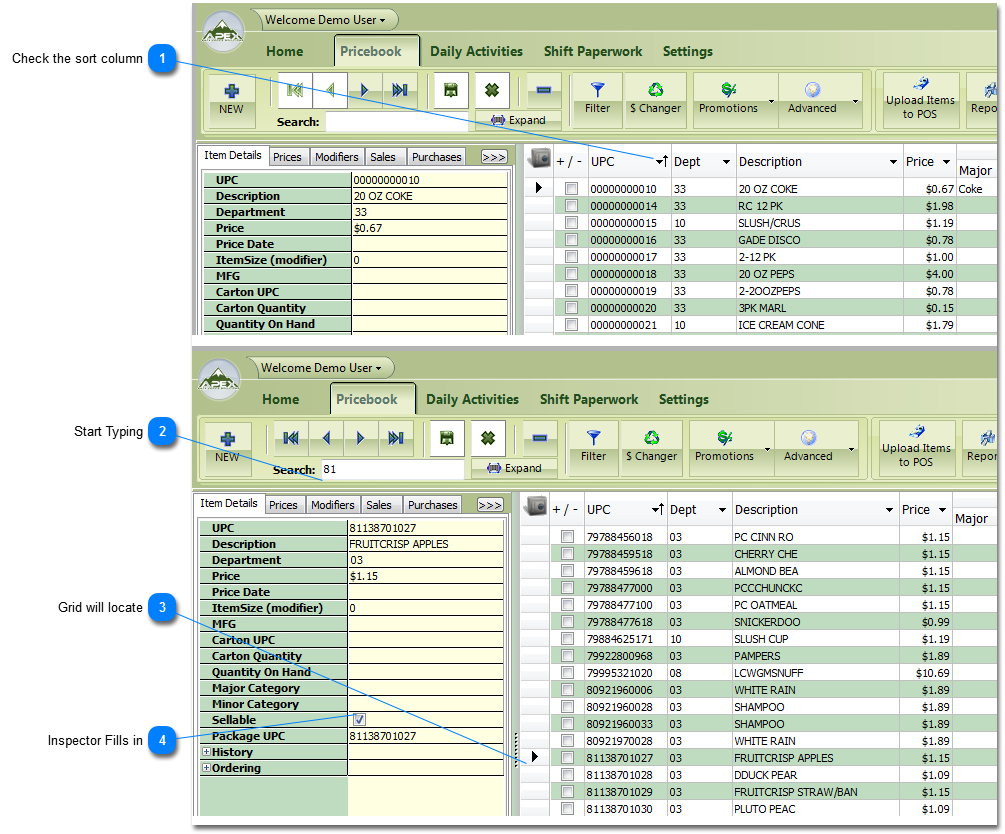
To Search the grid please follow this example. It will show you the basics for using the search tool.
 
Searching the Grid
 
At this point you can edit the Item's information in the Item inspector.
 
 
1

Check the sort column

1. Check the sort column 
Find the column with Direction Arrow by the Drop Down Arrow in the Grid. This shows you what column the Search box is going to search.  In this example we are searching the UPC column. If you want to change what column the search is going to use, please see the Sorting the Grid instructions on how to change the Search Column

2

Start Typing

2. Start Typing 
Start Typing the information you want to match.
3

Grid will locate

3. Grid will locate 
Grid will locate to first item it finds that is a match to the characters you typed.
4

Inspector Fills in

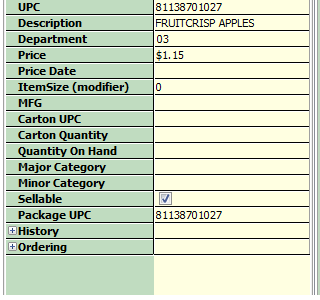
4. Inspector Fills in
When the grid locates to the item, the Item inspector populates with that items information.